





Adds XDSoft's DateTime picker as a date_time_picker input for forms, and date_time_range for filters.
On ActiveAdmin 4 the same inputs render the browser's native date and time controls instead; see ActiveAdmin 4.
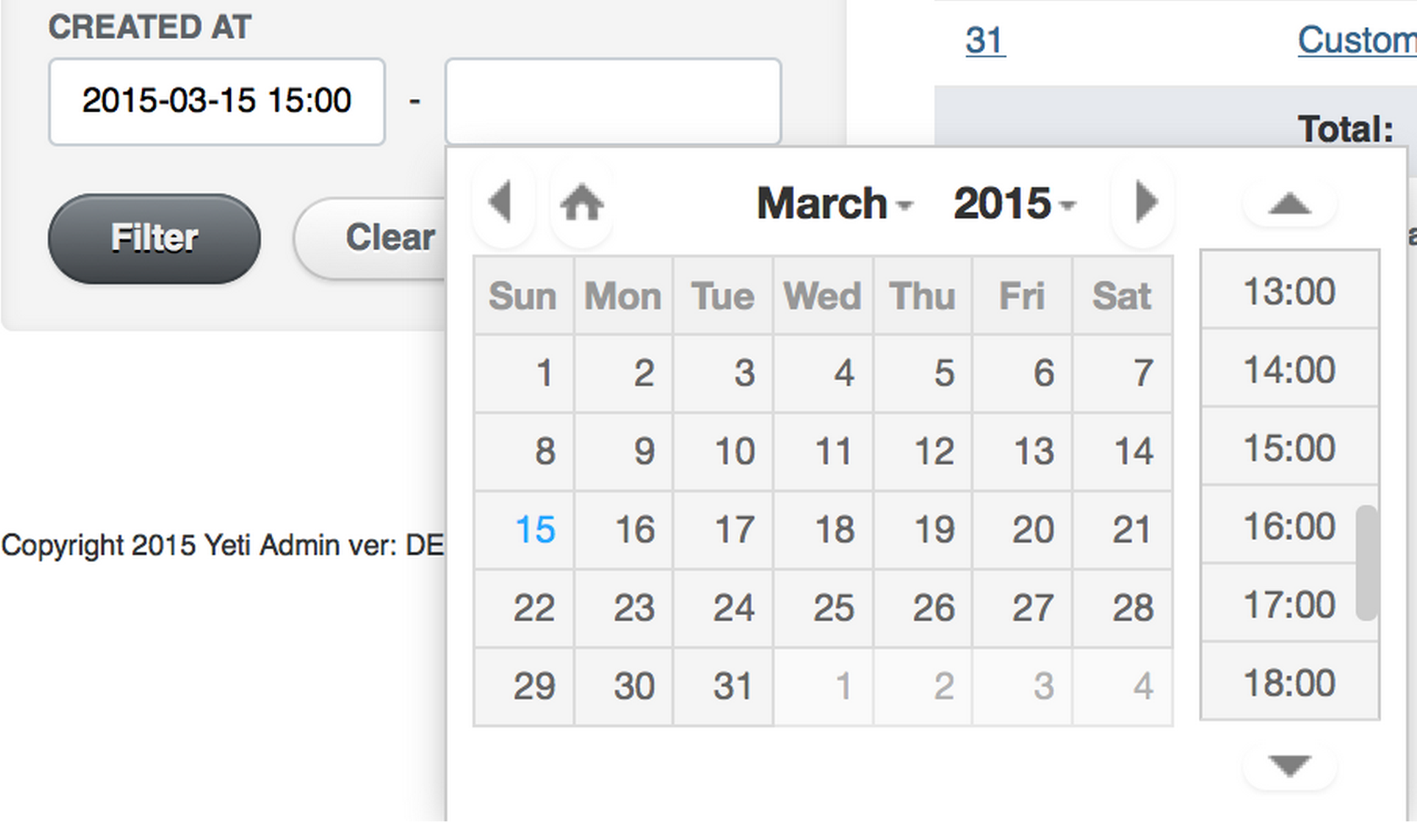
Add this line to your application's Gemfile:
gem 'active_admin_datetimepicker'And then execute:
$ bundle
Or install it yourself as:
$ gem install active_admin_datetimepicker
Add the following line into app/assets/stylesheets/active_admin.scss:
@import "active_admin_datetimepicker";Add the following line into app/assets/javascripts/active_admin.js:
//= require active_admin_datetimepickerExecute:
$ npm i @activeadmin-plugins/active_admin_datetimepicker
Or
$ yarn add @activeadmin-plugins/active_admin_datetimepicker
Or add manually to package.json:
"dependencies": {
  "@activeadmin-plugins/active_admin_datetimepicker": "latest"
}
and execute:
$ yarn
Add the following line into app/assets/javascripts/active_admin.js:
import '@activeadmin-plugins/active_admin_datetimepicker';Add the following line into app/assets/stylesheets/active_admin.scss:
@import '@activeadmin-plugins/active_admin_datetimepicker';This plugin adds the date_time_picker input and date_time_range filter, which use the XDSoft DateTime Picker.
The date_time_picker input accepts many of the options available to the standard jQueryUI Datepicker. For example:
  # Index page filters
  filter :created_at, as: :date_time_range

  # New/Edit form
  form do |f|
    f.input :starts_at, as: :date_time_picker, datepicker_options: { min_date: "2013-10-8",        max_date: "+3D" }
    f.input :ends_at,   as: :date_time_picker, datepicker_options: { min_date: 3.days.ago.to_date, max_date: "+1W +5D" }
  end
ActiveAdmin 4 ships without jQuery and Sprockets, so on ActiveAdmin 4 the gem
does not load the XDSoft picker. The date_time_picker input and the
date_time_range filter render native <input type="datetime-local"> fields
(type="date" for a date column), styled by ActiveAdmin itself. There is no
JavaScript or CSS to install: skip the Sprockets and NPM steps above.
Values use the HTML format, YYYY-MM-DDTHH:MM (YYYY-MM-DD for date fields).
ActiveAdminDatetimepicker::Base.format applies to ActiveAdmin 3 only.
Only these datepicker_options (and default_datetime_picker_options) have a
native equivalent and are applied on ActiveAdmin 4. Everything else is ignored.
| Option | Native attribute |
|---|---|
min_date, min_date_time |
min |
max_date, max_date_time |
max |
step (minutes) |
step (seconds, datetime-local only) |
min/max must be absolute dates (a Date, Time or a string like
"2024-01-31"); relative values such as "+3D" are dropped. An explicit
input_html: { min: ... } wins over the mapped value.
Unlike the XDSoft picker, the browser enforces min, max and step when the
form is submitted. A stored value outside the range, or off the step (10:07 with
step: 15), blocks the save until it is changed.
The markup carries data-* hooks for tests and other plugins:
- every input:
data-datetimepicker-input - the filter wrapper:
data-datetimepicker-range(on ActiveAdmin 4 it also keeps thefilter_date_time_rangeclass) - the filter inputs:
data-datetimepicker-range-input="from"and"to"
# This if for the front-end JavaScript side
ActiveAdminDatetimepicker::Base.default_datetime_picker_options = {
    defaultDate: proc { Time.current.strftime("%Y-%m-%d 00:00") }
}
# This if for the Ruby backend
ActiveAdminDatetimepicker::Base.format = "%Y-%m-%d %H:%M:%S"If you want to change the format you need to make sure that front-end and back-end formats are identical. And remember JS and Ruby datetime format have different syntaxes.
Create configuration file config/initializers/init_datetimepicker.rb:
# Example "11/03/2016 13:00"
ActiveAdminDatetimepicker::Base.default_datetime_picker_options = {
    format: 'd/m/Y H:i', # JS format
    defaultTime: proc { Time.current.strftime('%H:00') } # not necessary
}
ActiveAdminDatetimepicker::Base.format = "%d/%m/%Y %H:%M" # Ruby format
See the datetimepicker documentation for more details.
The upstream XDSoft stylesheet hardcodes a bright blue (#33aaff) on the
selected/current day, the current time slot and "today". This gem exposes that
color as a single SCSS variable so you can recolor the whole picker without
!important overrides. Set it before importing the gem; the default keeps
the original blue, so existing apps are unaffected:
$aa-datetimepicker-accent-color: #38678b; // your brand color
@import "active_admin_datetimepicker";The picker follows the host's dark theme using the same triggers as
active_admin_theme:
the OS prefers-color-scheme: dark preference and an explicit
html[data-theme="dark"]. Under either, the picker adopts XDSoft's built-in
.xdsoft_dark skin (its orange current/today, dark surfaces). A page pinned
with html[data-theme="light"] always stays light. No configuration is needed;
it works out of the box once the gem's stylesheet is imported.
Note: in dark mode the current/today cells use XDSoft's built-in dark skin
colors, not $aa-datetimepicker-accent-color.
- Fork it ( https://github.com/activeadmin-plugins/active_admin_datetimepicker/fork )
- Create your feature branch (
git checkout -b my-new-feature) - Commit your changes (
git commit -am 'Add some feature') - Push to the branch (
git push origin my-new-feature) - Create a new Pull Request